
PIFRA Salary Slip 2026 Online Registration for Govt Employees
WhatsApp Channel
Serving employees of the Pakistan government can now receive their monthly salary slips online through the PIFRA Pay Slip system. Government employees in Pakistan can easily get their PIFRA salary slips through the official PIFRA email service. You can download your PIFRA salary slips for May, and June directly from this page. Visit the official PIFRA website at PIFRA to access the salary registration page.
PIFRA Pay Slip 2026 – Guide to Download Monthly Salary Slip
In the past, employees had to wait for the office clerk or visit the District Accounts Office to get their salary slips. Now, the Project to Improve Financial Reporting and Auditing (PIFRA) has made the process digital and much easier. This online service is very convenient for government employees. They can check their salary slips through a direct link without visiting their office or HR accounts department. Employees can now receive their monthly salary slips directly in their email inbox free of cost.
Key Features of the PIFRA Pay Slip System
| Feature | Easy Description |
| Service Type | Online salary slip service |
| Launched By | Government of Pakistan (Ministry of Finance) |
| Managed By | AGPR and PIFRA Project |
| Users | All federal and provincial government employees |
| Delivery Method | Salary slips are sent through email |
| Frequency | Salary slip is provided every month |
| Purpose | To make salary information easy to access and improve transparency |
www.PIFRA.gov.pk Salary Slip Registration Online
The PIFRA salary slip system allows government employees to receive their monthly pay slips directly in their email inbox without visiting the accounts office. If you face any problems with your online salary slip or pension slip, you can contact us for help. PIFRA stands for the Project to Improve Financial Reporting and Auditing. This system was introduced by the Ministry of Finance, Government of Pakistan, to ensure transparent, reliable, and timely payment of salaries.
How to Register for PIFRA Pay Slip Online
Structure of a PIFRA Pay Slip
A PIFRA pay slip includes all important details about your monthly salary, allowances, and deductions. Below is a simple example of a PIFRA pay slip structure:
| Category | Example Details |
| Employee Name | Muhammad Ali |
| Employee ID | 45213 |
| Department | Education Department |
| Designation | Senior Teacher |
| Basic Pay | Rs. 85,000 |
| Allowances | Rs. 20,000 |
| Gross Salary | Rs. 105,000 |
| Deductions (Tax, GP Fund, etc.) | Rs. 5,000 |
| Net Pay | Rs. 100,000 |
| Month | October 2025 |
| Payment Method | Direct Bank Deposit |
This simple summary helps employees check and confirm their salary details every month
PIFRA Salary Slip 2026 By CNIC FABS CGA Pakistan
If you are looking for how to download a salary slip from PIFRA, wondering why your online pay slip has not arrived, or searching for the latest DDO codes for 2026, this guide will help you. In this guide, you will learn how to complete PIFRA salary slip registration, how to check your PIFRA salary slip online, and how government employees in Pakistan can receive their monthly pay slips through email.
| Description | Action |
| Download Slip | Click Here |
| Check Status | Click Here |
| Web Portal | Click Here |
| Email Process | Click Here |
| Online Registration | Click Here |
PIFRA Registration Form for Salary Slip 2026 Download PDF
You can download your monthly PIFRA pay slip from this page. Your salary slip and pension slip are now available through email. On this page, we will provide complete information about the PIFRA Pay Slip system, including how it works, who is eligible, the registration process for getting pay slips online, and its benefits. We will also show a sample salary slip format to help you understand it better.
Common Issues and Their Solutions
| Problem | Possible Reason | Solution |
| Salary slip not received | Wrong email address or registration mistake | Register again with the correct email address |
| Salary slip goes to spam folder | Email filter problem | Check your spam or junk folder and mark the email as “Not Spam” |
| Incorrect details on salary slip | Wrong information entered during registration | Contact your accounts office or AGPR |
| Delay in receiving salary slip | Technical issue or processing delay | Wait for the monthly salary processing cycle |
PIFRA Pay Slip Download 2026 Online by CNIC
For complete pay slip management, visit FABS, sign in to your account, and go to the Services section. This program introduced the PIFRA Pay Slip system, an online service that has changed the way government employees in Pakistan manage their salaries and pensions. You can also register online for salary slips through the official PIFRA website at PIFRA.
CMH Rawalpindi Jobs 2026 Last Date
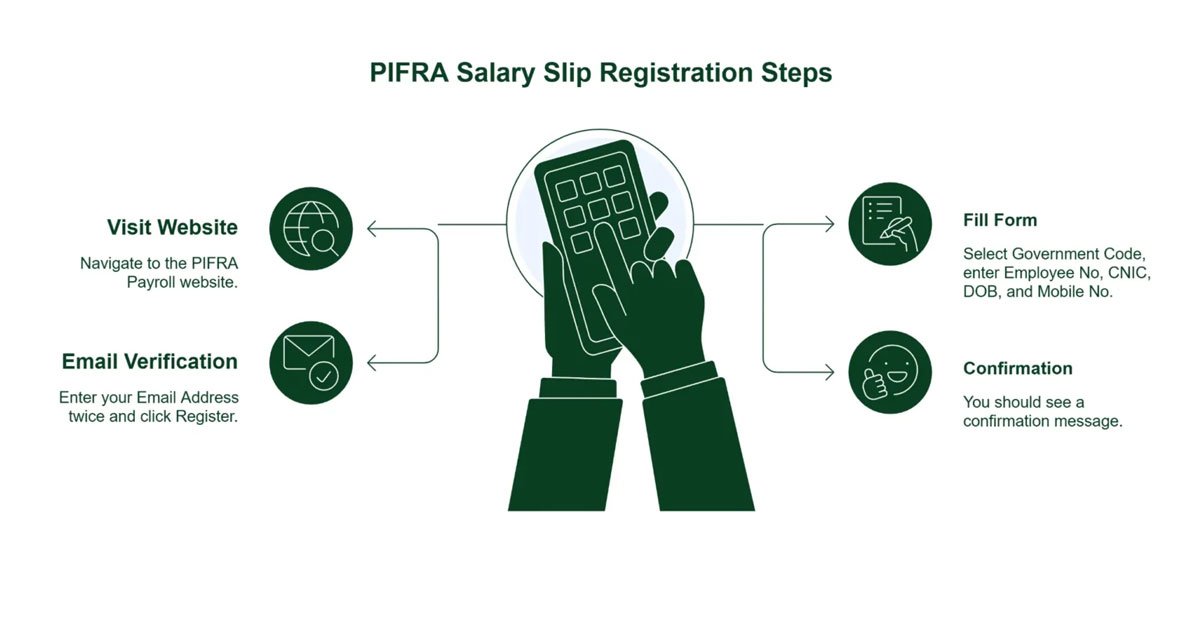
How to Create a PIFRA Salary Slip Account? (Step-by-Step)
Follow these simple steps carefully to avoid the “Employee Not Found” error.
Step 1: Visit the PIFRA Salary Slip Website
Go to the official PIFRA salary slip page:
PIFRA Salary Slip Portal
2026 Browser Issue Fix:
If Google Chrome shows the message “Your Connection is Not Private,” click Advanced and then select Proceed to m.pifra.gov.pk (unsafe). This happens because the government website uses an older SSL certificate that may not meet modern browser standards.
Step 2: Fill in the Registration Form
Select Your Government Code:
- F = Federal Government (Islamabad, Ministries, Military Civilians)
- P = Punjab
- S = Sindh
- N = KPK (Old code for NWFP)
- B = Balochistan
- K = AJK (Azad Jammu & Kashmir)
- G = Gilgit Baltistan
- C = Council of Works
Enter the Following Details:
- Employee Personal Number: Example: 12345678
- CNIC Number: Example: 3520212345671 (without dashes)
- Date of Birth: Example: 15-08-1985
- Mobile Number: Example: 03001234567
Step 3: Verify Your Email Address
After clicking the Submit button, a new box will appear asking for your email address.
- Enter your email address two times
Example: ali.khan@gmail.com - Click on the Register button
Step 4: Registration Confirmation
After successful registration, you will see the message:
“Your monthly salary slip has been registered.”
You may not receive a confirmation email immediately. Your first salary slip will usually arrive in your email inbox during the next payroll cycle, normally by the 10th of the following month.